
HAL stands for Harmonic Activity Locator and visualizes the harmonics of fault frequencies. The algorithm is used for detecting any fault in the machine.
Harmonic frequencies are detected by:
- Multiple of running speed
- Bearing specific frequencies
Currently, HAL alarms configurations are defined and imported from @ptitude Analyst. If a HAL alarm is triggered for an asset a sticker will be displayed in the list view.

Triggered HAL alarms will also be listed in Reasons for Analysis with the same sticker.
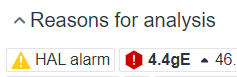
Clicking the sticker will display the details view for the asset and which measurement triggered the HAL alarm.
If a HAL alarm has been triggered, it will be displayed in the spectrum chart. Alert and danger levels are displayed in yellow and red respectively.
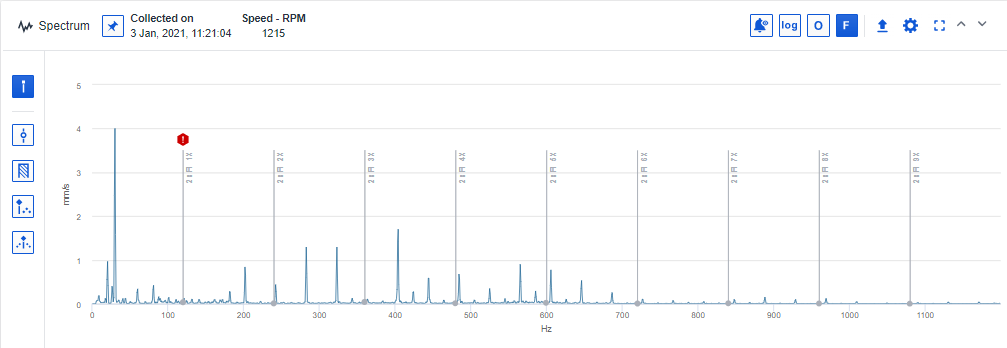
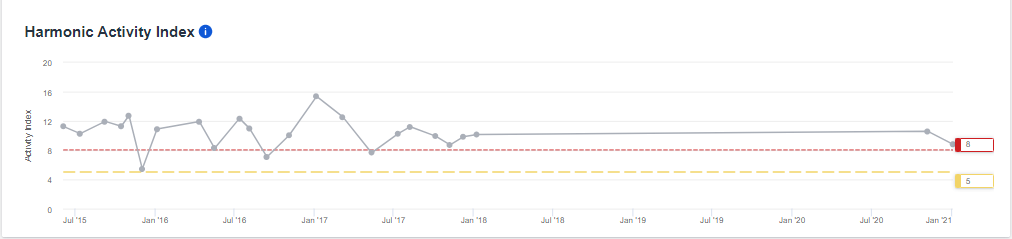
The trend is displaying the Harmonic Activity Index (HAI) evolving with relation to the alarm thresholds. If multiple alarms are active, the different trends are showcased but not the individual thresholds.
HAI is based on the difference between raised harmonic amplitudes and all other amplitudes for an asset. The larger the HAL index is, the more likely it is that there is a problem in the asset.
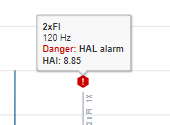
Hovering over the cursor of the fault frequency reveals a tooltip with the reason for the alarm and the HAI value.
Comments
0 comments
Please sign in to leave a comment.