
Streamline Detection is the assisted reporting logic in Enlight Centre. When certain conditions (image below) are met, Streamline Detection automatically reports some assets so that the analyst no longer needs to manually analyse them. Remaining assets are then evaluated for manual analysis. This evaluation makes sure these assets have a priority number and a list of reasons why they need to be analysed.
Streamline Detection can be turned on and off:
- On a site level - in the hierarchy node
- This can be done only by a system manager. Please get in contact with technical support or your SKF representative in order to enable it.
- On an asset level - using the manual flag
 in the asset's Analyze Detail View - given Streamline Detection has been enabled on the site that asset belongs to. Activating the flag ensure the asset is never automatically reported
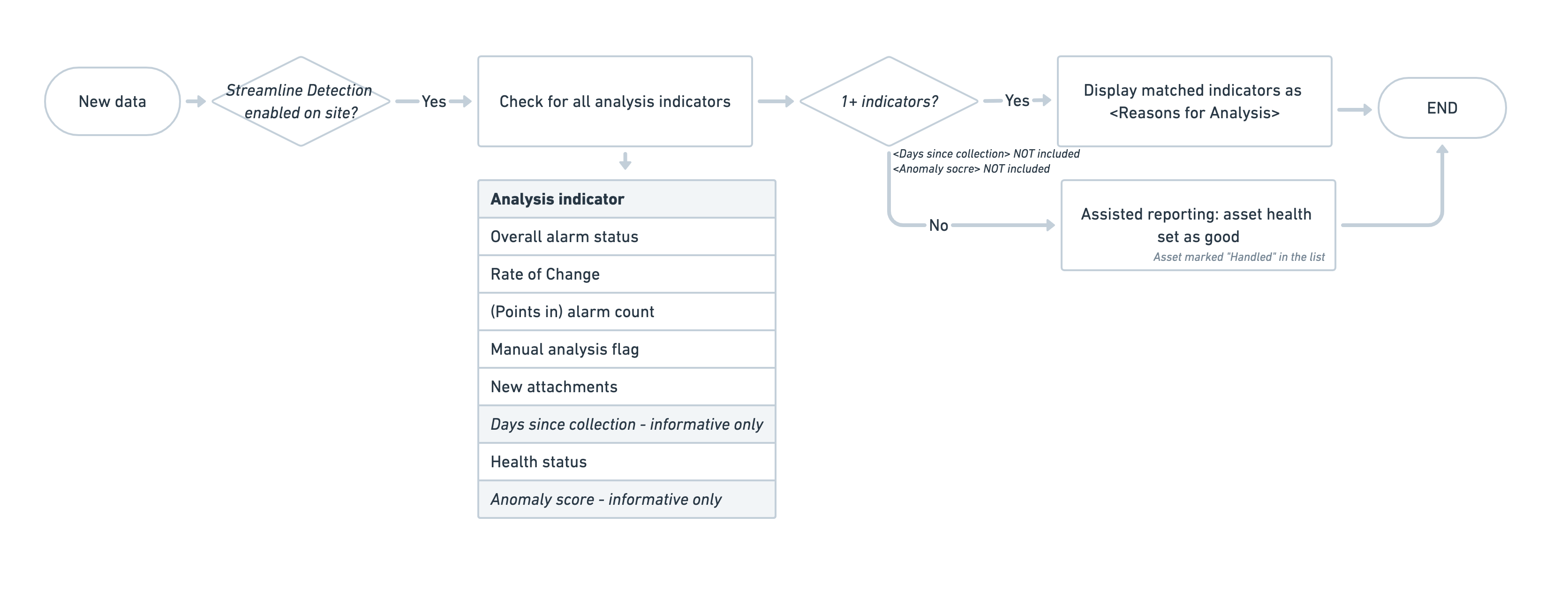
Understanding streamline detection
The manual process (without streamline detection)
Enlight Centre exists to help manage monitoring and reporting of assets using measurement data. Traditionally data is manually collected using handheld devices, and the asset is manually reported on the basis of this data. The asset goes from being handled (reported) to being unhandled (waiting to be reported) and back again. New measurements make the asset unhandled, a report makes the asset handled.
In the first example, an asset has new data, and is awaiting reporting. The asset is unhandled. In the second example, the asset was reported following new data, and the asset is now handled.


The updated process (enabling some automation using streamline detection)
Streamline detection is an automated process which aims to take assets that do not need manual analysis, and automatically report them. At the current time, this only applies to the simplest cases where all checks show that there is no problem, and that the asset can be reported as good. In the future our ambition is to gradually also support reporting faults, but at the moment we only focus on reporting assets as good, for the simplest cases.
With streamline detection enabled, Enlight Centre automatically examines assets when new measurements are collected. If a certain number of conditions are all met, then Enlight Centre will automatically report the asset as having asset health good. The asset reported date is updated to today. The asset is marked as Handled (by system). If not all the conditions are met, then processing falls back to manual processing.

Working with streamline detection
When observing Enlight Centre setting some assets to Handled by system, and other assets not automatically handled, it is important to understand the two steps involved. Firstly, an event needs to trigger the calculation. This event is usually a new measurement for a point within the asset. Once the event has triggered, the second step is the calculation itself. Only if all the conditions are met is a message sent to the reporting service to set the asset automatically to asset health good.
If the intention is to see an asset set to Handled by system, then the user needs to upload to Enlight Centre a new measurement for a point on that asset, whilst ensuring that all the conditions are met. If the intention is to see that an asset is not handled by system, then the user needs to upload a new measurement for a point on that asset, whilst ensuring that at least one condition is not met.
Note that there is a delay of up to fifteen minutes between a new measurement being uploaded to Enlight Centre, and the streamline detection calculation being run.
Triggers
| Event | Explanation |
|---|---|
| no alarm | there is a change to a point alarm status within the asset, and the asset's alarm status is now green |
| no alarm | alarm recalculation triggered by new measurement - a new measurement changes a point alarm status, and the asset's alarm status is now green |
| low rate of change | there is a new measurement for a point which changes a point rate of change, and the asset's overall rate of change status is now green |
Conditions
| Condition | Explanation |
|---|---|
| Site |
Asset must belong to a site which is activated for streamline detection |
| Manual analysis |
Asset must not be marked for manual analysis |
| Pending state |
Asset must not be marked as pending |
| Attachment |
The asset must have no unhandled attachments |
| Last collected |
The asset must have a new measurement that is more recent than the latest report |
| Last reported |
The asset must not have been reported since the last collection |
| Alarm status |
Asset alarm status must be good - none of the asset's points have an alert or danger alarm |
| Band alarm status |
If band alarms are defined on the asset's vibration points, then their status must not be alert or danger |
| Health status |
Asset health status must be good |
| Open faults |
The asset may not have any open faults |
| Fault draft |
The asset may not have any fault draft |
| Rate of change |
The asset's rate of change must be below the alert threshold |
| Vibration Severity Assessment |
If VSA is defined for the asset, then the status must not be set to high or very high |
| RagDB |
If RagDB is defined for the asset, then the status must not be set to high or very high |
| Harmonic Activity Locator alarm |
If HAL alarms are defined for the asset, then the status must not be alert or danger |
Automated measurement collection
As explained above, an asset becomes handled when it is reported. An asset becomes unhandled when new measurements are uploaded. This works well for manual processing, but it needs to be adapted for automated processing when new measurements are continuously uploaded by connected sensors. If the frequency of measurements being uploaded exceeds a certain threshold, then extra rules apply.
- A high frequency asset is defined as an asset that uploads measurement data on average more frequently than once a day, based on the most recent 5 measurements.
- If streamline detection reports a high-frequency asset as good, then Enlight Centre will ensure a gap of at least a week before the next good report (this time gap is put in place in order to prevent distraction and keep analysts focused, as high-frequency report updates might not provide the best value).
- Once a high-frequency asset is reported, it remains handled for at least a week (the Smartlist handled filter will ensure it is filtered out).
- High-frequency points do not contribute to the asset's rate of change - in Enlight Centre it will appear that the point has no rate of change.
Comments
0 comments
Please sign in to leave a comment.