
New and improved features released on 2020-10-29. ProCollect is available from App Store and Google Play.
Release highlights
ProCollect
1.4
Redesigned UI for routes download and measurement upload - more consistency, control and clearer feedback for the user!
- Auto-update of routes when opening ProCollect is removed
- Pull to refresh gesture removed
- Sync button in the upper right corner removed
- Buttons with progress bar for both download routes and upload measurement
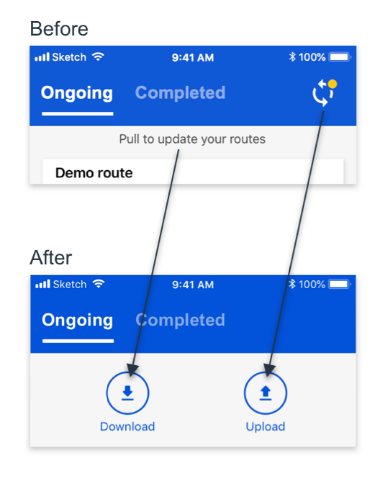
Figure 1. Redesigned UI for routes download and measurement upload
Additional download setting where the user can enable/disable download of for asset images and additional info.
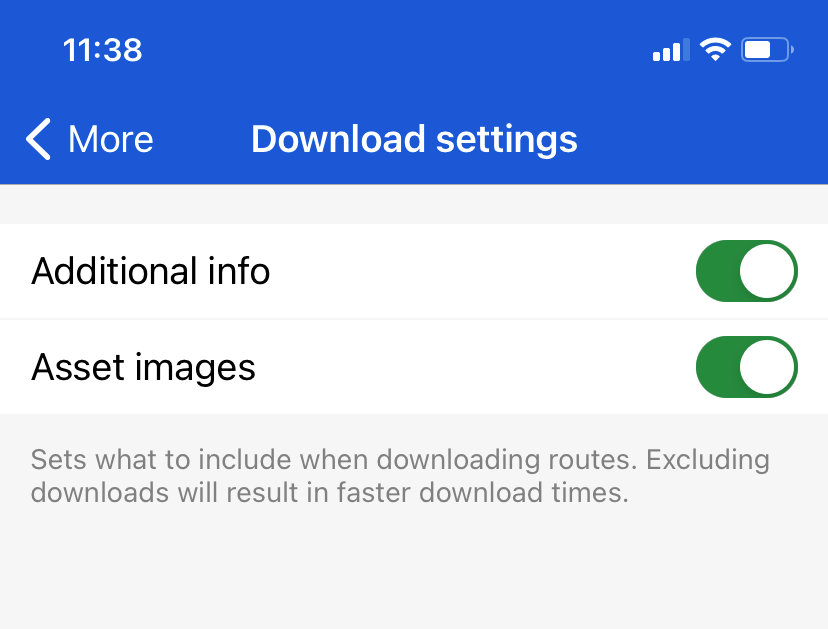
Figure 2. Download settings.
Analyze
Rate of Change
Rate of Change is described in a separate article.
Quick reporting
Instead of going back and forth between the Analyze and the Reports pages, you can use the two new buttons Set as good and Confirm status directly from the detail view page of Analyze.
In order for the quick reporting to be enabled and the two buttons to be visible, the conditions illustrated below need to be met.

Figure 3. Quick reporting conditions, Analyze Detail View

Figure 4. Quick reporting, Set as good

Figure 5. Quick reporting, Confirm status
Hierarchy changes
In order to improve data consistency and to comply with SKF standards,
- Plant is now a mandatory hierarchy node
- It is no longer possible for a user to create Sites
Routes
When creating or editing a route you can now search for functional location and asset names. You can also filter the list by asset type.
Comments
0 comments
Please sign in to leave a comment.