
Hierarchies are used to set up companies in a structured way so that condition monitoring can be performed.
The Hierarchy panel displays an overview of a company’s Sites with Functional Locations, Assets, Measurement Locations (containing one or many Measurement Points) and Inspection Points available for the user.
The view is divided into levels. This is an example:
- Root Level (Company)
- Level 1 (Site)
- Level 2 (Plant, Ship, System or Functional Location)
- Level 3 (System or Functional Location)
- Level 4 (System, Functional Location or Asset)
- Level 5 (Asset, Measurement location, Inspection Point or Lubrication Point)
- Level 6 (Measurement Point, Inspection Point or Lubrication Point)
The available Sites with Functional Locations visible in the overview depends on which customer hierarchies the user is assigned access to, by an administrator.
Important: To use Route functionality, Hierarchies need to have either Plant or Ship.
- Select the Hierarchy panel in the main menu.
- Navigate through the hierarchy tree to reach the desired view.
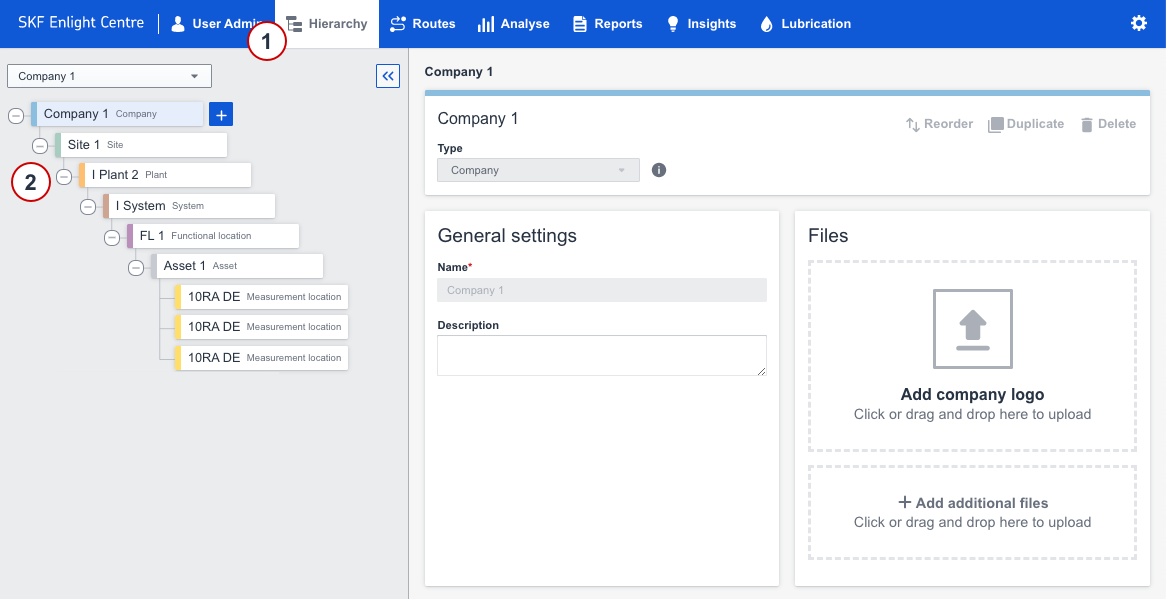
Hierarchy Tree and Hierarchy Cards
Comments
0 comments
Please sign in to leave a comment.