
An Asset selected in the Hierarchy panel can be assigned an Asset Type according to the SKF taxonomy and, if applicable, an Asset Sequence.
In addition, it is possible to upload an image for each Asset. The image is shown in the ProCollect App, if the Asset is in a Route.
- Select the desired Asset to update.
- Select the Asset Type either by searching or viewing the drop-down list.
- When applicable and Asset sequence exists in the taxonomy for the selected Asset, a dropdown will appear for selecting the Asset Sequence (for example Motor - Electric).
- Upload an image to the Asset, either by clicking “Add Asset Image” to browse, or by dragging and then dropping the desired image.
- Press Save.
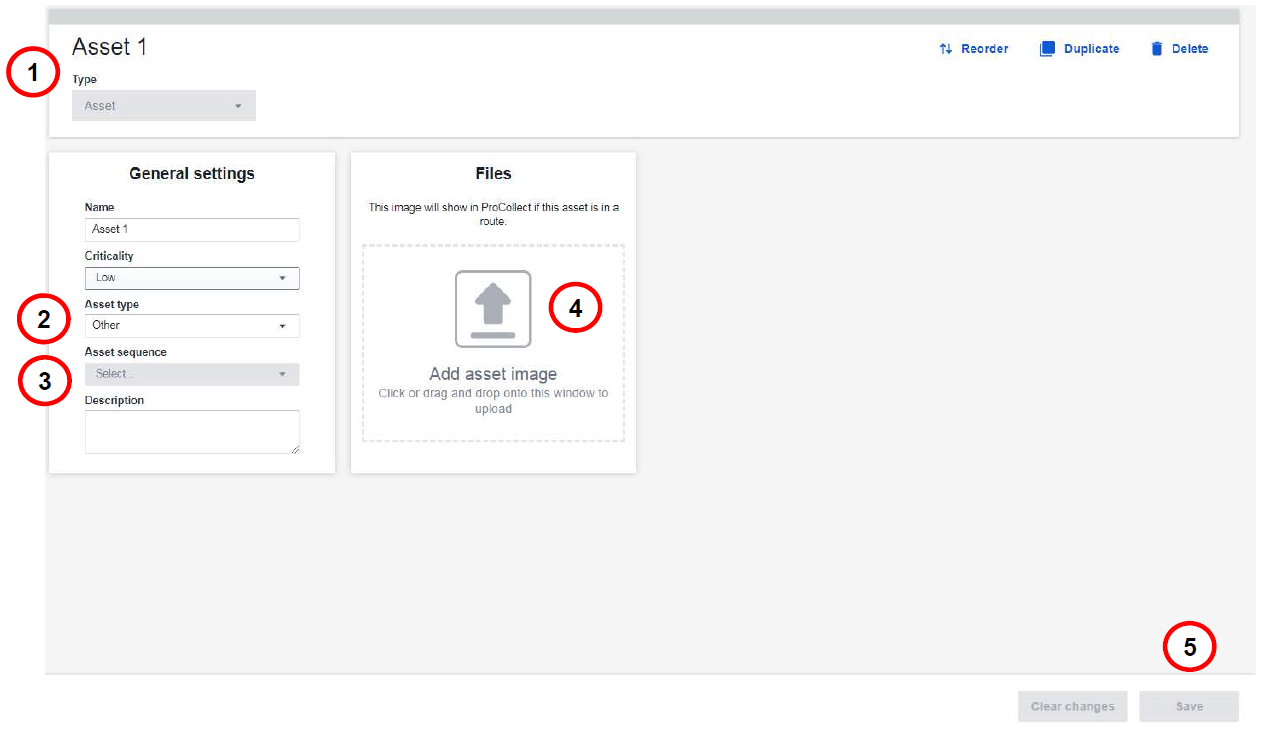
Assign type, sequence and upload image for an Asset
Comments
0 comments
Article is closed for comments.