
Enlight-RecommendedActions is combining data from multiple backend services and exposing four API endpoints.
Customers can use these to handle actions they have been recommended to perform, related to any reported faults.in Enlight.
The URL for accessing this API is [BASE_URL]/recommended-actions/[ENDPOINT_PATH]. The [BASE_URL] depends on the environment you are communicating with, and should be given to you as part of the onboarding process. The [ENDPOINT_PATH] depends on which particular endpoint of the API you want to call.
The API has four endpoints: GET /actions, PATCH /actions/:action_id, POST /actions/:action_id/perform and POST /actions/:actionId/reject.
To call the API you need to acquire an access token from Gravitee-Token API.
GET /actions
[BASE_URL]/recommended-actions/actions
This call returns a list of the recommended actions that the company has in the time range specified by the parameters fromDate and toDate. You also have the option to request actions that have a certain status: ALL, PENDING, or REJECTED.
PATCH /actions/:action_id
[BASE_URL]/recommended-actions/actions/:action_id
This call adds a work order id to the action in Enlight. The call requires an action ID that you will receive in the GET /actions call described above.
POST /actions/:action_id/perform
[BASE_URL]/recommended-actions/actions/:action_id/perform
Update an action by marking it in Enlight as having been performed.
POST /actions/:action_id/reject
[BASE_URL]/recommended-actions//actions/:action_id/reject
Update an action by marking it in Enlight as one that you are not going to perform.
For more details download the open API specification.
OpenAPI Specification (Swagger)
The OpenAPI specification can be found here.
Field descriptions:
Details of API request and response field descriptions are available in the OpenAPI specification attached to this article.
Support Instructions:
If you need support or to get started create a ticket in Zendesk and the team responsible within SKF will be contacted.
Comments
7 comments
Is the public API open to all Enlight Users? Or it is for internal usage only?
Hello Steve,
Enlight public APIs are open to all Enlight users. Users can subscribe to these APIs.
Noted with thanks. This is a great news for customers who wanna take advantage of their collected data!
Can you have one simple example to show one set of Asset ID, overall or trend?!
Here is an example:
{
"actions": [
{
"assetId": "9541f713-8a4e-46a9-b1fb-459a03b6f277",
"assetName": "RecommendedActionsTestHierarchy-Asset",
"assetDescription": "RecommendedActionsTest description",
"assetFamily": "Compressor",
"cmTechnique": "Electrical testing",
"assetHealth": "",
"siteName": "RecommendedActionsTestHierarchy-Site",
"plantName": "RecommendedActionsTestHierarchy-Plant",
"functionalLocationName": "RecommendedActionsTestHierarchy-FunctionalLocation",
"faultNumber": "F-001",
"faultType": "Air gap eccentricity",
"faultSeverity": "severe",
"faultObservation": "There is oil everywhere",
"actionId": "5b169899-3156-46fc-8bb0-30438f092a1c",
"actionType": "Inspection",
"actionDescription": "Check electrical connections",
"actionComment": "Perform Action Comment",
"actionCreatedAt": "2022-07-14T09:26:54Z",
"actionCreatedBy": "Snaplogic Dev",
"actionStatus": "pending",
"actionDueDate": "2022-07-24T11:26:03Z",
"actionDoneDate": null,
"actionFeedbackComment": null
},
Hello TSG,
The customer (Asia Cement Corporation) is trying to test Public APIs of Enlight Centre and they got information which is " you don't have permission to access...". as attached.
Can you help us how to make it work? Thanks a lot.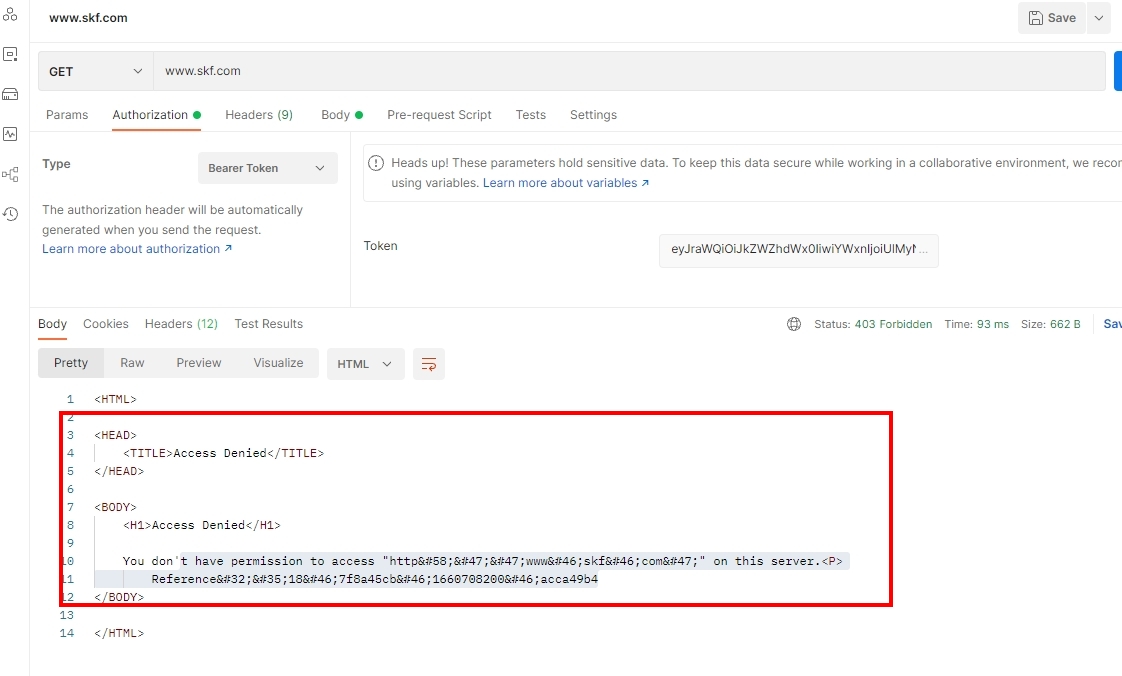

My csutomer is asking if SKF Enlight Centre can open the specturm via API ?!
Please sign in to leave a comment.